Connect Your Shopify Store & Analyze Refund Data
Learn how to track refunds on Shopify with precision. Follow our step-by-step workflow from secure read-only store connection to SKU variant diagnostics, AI pattern clustering, and post-check trend measurement.
Connect Your Shopify Store & Sync Refund Data
Authenticate your Shopify store to initiate a secure connection. The app synchronizes historical order and refund records while listening for ongoing refund webhooks.
Discover Incoming Refund & Order Events
Order and refund events are ingested and parsed across all Shopify sales channels. Line items, quantities, and customer-reported notes are structured automatically.
Diagnose Product, Variant & Reported Reasons
Drill down from high-level catalog refund numbers into specific size and color variants. See which SKUs drive disproportionate return volume.
Variant Refund Analysis Table
Sorted by Refund Value| Variant SKU | Refund Qty | Refund Rate | Primary Reason |
|---|---|---|---|
| CLS-NVY-L (Navy / L) | 24 units | 12.2% | Chest too tight |
| CLS-NVY-M (Navy / M) | 9 units | 3.3% | Standard return |
Quantify Refund Value & Affected Revenue
Calculate total dollar values returned per product line and evaluate overall refund unit percentages across your order history.
AI Pattern Identification & Manual Check Checklist
AI aggregates unstructured customer notes to highlight patterns that may point to sizing discrepancies or description mismatches, suggesting manual checks.
72% of reported feedback notes for Classic Linen Shirt (Size L) mention tight chest measurements.
Measure & Monitor Refund Trends Over Time
Monitor refund rates over subsequent 30-day periods after making product page copy or size guide updates to observe return rate changes.
The 5-Phase Continuous Refund Loop
Refund reduction is an ongoing cycle. RefundLens connects every phase, from raw Shopify data ingestion to SKU diagnosis, financial quantification, product page fixes, and post-check measurement.
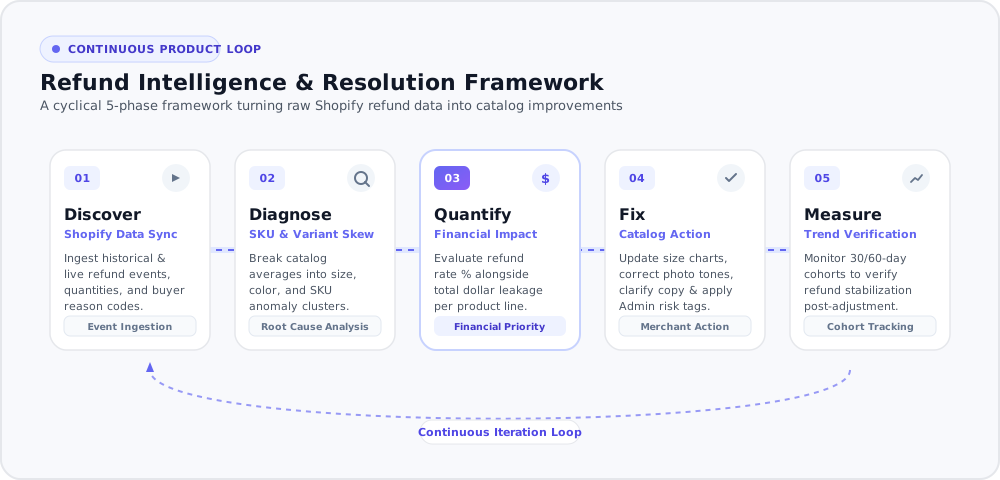
The 5-Step Refund Intelligence Loop
From initial store connection to continuous trend measurement: how merchants transform refund records into clearer decisions.
Shopify Data Sync & Order Event Processing
Automatically pulls historical and ongoing refund events across all Shopify sales channels.
Different From a Return Portal
Return portals manage buyer return labels and physical logistics. RefundLens: AI Refund Insights analyzes refund and order data to help you understand why items are returned.
Return & Exchange Portals
Reverse Logistics & Label ProcessingRefundLens: AI Refund Insights
Refund Intelligence & AnalyticsTurn Refund Data Into Clearer Decisions
Understand refund trends, identify products driving refund activity, and discover catalog patterns worth investigating.