
Summarize this guide with your preferred AI tool
Note: If prompt prefill is restricted by your browser, paste the copied prompt directly into the AI tool.
Table of Contents
- 1. What Is Shopify Refund Analytics?
- 2. How to Find Refunded Orders in Shopify
- Refunded Orders vs. Physical Returns
- 3. How to Analyze Shopify Refund Data
- Refund count
- Refund rate & calculation formula
- Total refunded amount & profit context
- Product and variant refund trends
- 4. How to Find Common Shopify Refund Reasons
- Grouping recorded reasons into categories
- 5. How to Identify Products With High Refund Activity
- Product-Level Report Structure
- 6. How to Track Refund Trends Over Time
- 7. Manual Reports vs. Analytics Apps
- Shopify's built-in reporting
- Spreadsheets and manual exports
- Dedicated refund analytics apps
- 8. How RefundLens Helps You Investigate Refund Patterns
- 9. A Practical Shopify Refund Analysis Checklist
- Frequently Asked Questions
- Conclusion
- Ketul Sindhwad
Refunds are a normal part of running an ecommerce business. Customers may receive the wrong item, experience a product-quality issue, encounter delivery problems, or change their minds after making a purchase.
The challenge for Shopify merchants isn't simply processing refunds. It's understanding the patterns behind them.
Which products account for the most refunds? Are certain variants refunded more frequently? What reasons appear repeatedly in your refund records? How much money is being refunded over time?
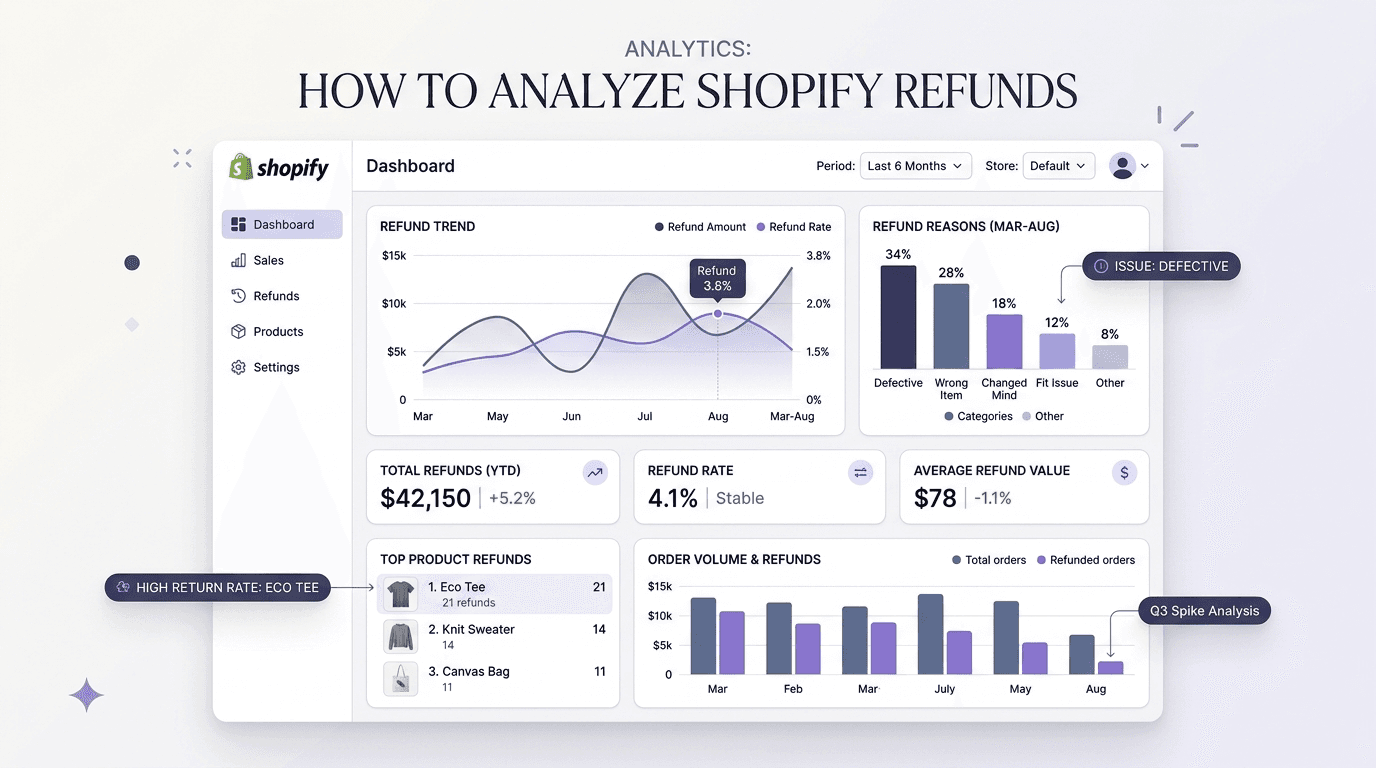
Shopify refund analytics helps merchants investigate these questions by organizing refund data into useful reports, trends, and product-level insights. This guide explains how to review your Shopify refunds, what metrics to examine, and how to use the findings to make more informed business decisions.
Key Takeaways for Merchants
- Separate refunds from returns: A refund is financial reimbursement; a return is physical item recovery. Not all refunded orders require or receive a physical return.
- Always contextualize with sales: A high refund count on a bestseller may simply reflect high demand, whereas a modest count on a low-volume product could reveal a high refund rate.
- Measure total monetary value: Refund amount measures financial leakage. High-value SKUs can drive significant revenue loss even with relatively low return frequency.
- Treat reasons as investigative clues: Recorded notes highlight customer friction (damaged goods, fit issues, inaccurate descriptions) but require verification before drawing conclusions.
- Compare equivalent timeframes: Track counts and amounts week-over-week or month-over-month to avoid mistaking normal seasonal spikes for product deterioration.
1. What Is Shopify Refund Analytics?
Shopify refund analytics is the process of examining refund-related data to understand how refunds affect your store.
Rather than looking at individual refunds in isolation, merchants can review patterns across products, variants, refund amounts, recorded reasons, and time periods.
For example, a store might discover that:
- Concentrated volume: A particular product accounts for a large share of its refund volume.
- Variant skews: One product variant appears in refund records more frequently than others.
- Month-over-month increases: Refund amounts have increased compared with the previous month.
- Recurring customer feedback: Several refunds contain similar recorded explanations.
- High-priority items: Certain products deserve a closer review because of their refund frequency or financial impact.
Important note on analytical evidence: These patterns don't automatically explain why a refund occurred. However, they can help you decide where to investigate further.
2. How to Find Refunded Orders in Shopify
Before analyzing refund trends, you need to identify the relevant orders and transactions.
You can start in your Shopify admin:
Navigate to the Orders tab in your Shopify admin navigation menu.
Use the available order filters to find orders with a Refunded or Partially refunded financial status.
Click into individual orders to review their transaction timeline and specific line items.
Examine the refund amount, affected items, transaction details, and any recorded refund notes available for that order.
Record the data needed for aggregate analysis, or explore the reporting options available in Shopify Analytics.
Understanding the distinction: Refunded orders vs. Physical returns
Keep in mind that a refunded order and a physically returned product are not necessarily the same thing. An order can receive a refund without a physical item being returned, depending on the circumstances (such as an order cancellation before fulfillment, customer appeasement, or damage in transit where return shipping is uneconomical).
Understanding this distinction is important when calculating return rates or comparing refund activity across products.
3. How to Analyze Shopify Refund Data
Once you've located the relevant records, focus on a few useful measurements.
Refund count
The refund count shows how many refunds occurred during a selected period.
Compare counts across weeks or months to identify changes in refund activity. A rising count may warrant investigation, but it doesn't necessarily indicate a problem without considering order volume and business context.
Refund rate
A refund rate compares refund activity with an appropriate measure of sales or orders.
For example, you could calculate the percentage of orders that received at least one refund:
Illustrative calculation: Suppose a store processed 1,000 orders in a month, and 40 of those orders received at least one refund.
40 ÷ 1,000 × 100 = 4.0% Order Refund Rate
Note: This is an illustrative calculation, not an industry benchmark.
Define your measurement period and counting method consistently. Counting refund transactions instead of unique refunded orders can produce a different result, particularly when an order receives multiple or partial refunds.
Total refunded amount
The total refunded amount measures the monetary value of refunds during a selected period.
Compare this figure across time periods and products to understand where refund-related financial impact is concentrated.
Be careful when comparing refunds with sales or profit. Refund amounts alone don't establish the full profitability impact because product costs, payment fees, shipping, discounts, and other expenses may also matter.
Product and variant refund trends
Product-level analysis can reveal which items appear most frequently in refund records.
Consider examining:
- Products with the highest refund counts.
- Products associated with the largest refunded amounts.
- Variants that appear frequently in refund records.
- Products whose refund activity has changed over time.
A product with many refunds isn't necessarily performing poorly. It may also have a high sales volume.
Where possible, compare refund activity with units sold or orders containing that product. This provides more context than ranking products by refund count alone.
4. How to Find Common Shopify Refund Reasons
Refund reasons can help you investigate recurring customer experiences.
Start by reviewing the reason or note recorded when a refund was processed. Depending on your store's workflow and available data, these records may contain information such as:
Product not as described
Discrepancies in photography, undertones, material feel, or specifications.
Incorrect or damaged item
Warehouse picking errors, inadequate bubble wrap, or carrier damage.
Shipping or delivery problems
Extended shipping delays, lost packages, or missed delivery deadlines.
Product-quality concerns
Defects, stitching issues, faulty zippers, or hardware durability problems.
Customer cancellation or change of mind
Accidental duplicate orders, buyer remorse, or gift preferences.
These are examples of possible explanations, not a guarantee that every Shopify refund record contains a standardized reason.
Group similar recorded reasons into consistent categories when practical. Then compare the categories across products and time periods.
For example, if multiple refunds for the same product mention damage, you might investigate packaging, fulfillment procedures, and product handling.
If customers repeatedly describe a product differently from how it appears in the listing, reviewing the description, specifications, and images may be worthwhile.
Treat refund reasons as evidence to investigate, not proof of a root cause. Some records may contain incomplete information, and the recorded explanation may not tell the whole story.
If your store needs more detailed customer feedback than its existing refund records provide, consider whether a separate post-refund survey process would help.
5. How to Identify Products With High Refund Activity
Finding products with high refund activity can help merchants prioritize their analysis.
A practical approach is to create a product-level report containing the following structured dimensions:
| Metric | What it helps you understand |
|---|---|
| Product name | Which item is being analyzed |
| Orders or units sold | The context behind product demand |
| Refund count | How frequently refunds occur |
| Refunded amount | The monetary value of recorded refunds |
| Recorded refund reasons | Explanations available in the refund records |
| Refund trend | Whether activity is changing over time |
Sort the report by refund count or refunded amount, depending on the question you're trying to answer.
Next, investigate products that stand out.
For example, a product with a high refund count might deserve a closer look at its sales volume and customer feedback. A product with a lower refund count but a large refunded amount may also warrant attention.
The objective isn't to label every frequently refunded product as a problem. It's to identify where additional investigation could be useful. For a step-by-step framework on isolating return-heavy items and variant skews, see our companion guide on how to find which products cause the most refunds on Shopify.
6. How to Track Refund Trends Over Time
A single month's data provides only a limited view of your store's refund activity.
Comparing multiple periods can help you recognize changes and decide whether they need further investigation.
Consider tracking:
For example, an increase in refunds could coincide with a major sales campaign, a new product launch, or a change in fulfillment operations.
Compare equivalent periods where possible and account for changes in sales volume. Otherwise, normal business growth or seasonality may be mistaken for a deterioration in product performance.
Use the trends to develop questions worth investigating rather than assuming that a change has one obvious explanation.
7. Shopify Refund Reporting: Manual Reports vs. Analytics Apps
There are several ways to review refund data, depending on your store's needs.
Shopify's built-in reporting
Shopify provides order-management and reporting tools that merchants can use to investigate refund activity.
These tools are a sensible starting point, especially when you need to inspect individual orders or review the reports available on your plan.
However, your reporting workflow may require additional steps when you want to combine information from different records or repeatedly compare product-level trends. The reports and fields available can vary, so check the options available in your own Shopify admin.
Spreadsheets and exports
Exported data can be useful when you want to organize records, create custom calculations, or compare selected fields. For occasional analysis, a spreadsheet may be sufficient.
The trade-off is that recurring reports can require manual preparation, consistent formatting, and careful handling of partial refunds and duplicate records.
Dedicated refund analytics apps
A dedicated Shopify refund analytics app can provide a more focused view of refund data.
Depending on the app, available functionality may include product and variant analysis, refund trends, recorded reasons, financial-impact summaries, and automated insights. You can explore our dedicated Shopify refund diagnostic features to see how automated variant tracking and pattern clustering operate in practice.
When evaluating an app, check which records it analyzes, what historical data it supports, whether it can distinguish refund transactions from physical returns, and how its reports are calculated. Choose a solution based on the questions you need answered rather than the number of charts it displays.
8. How RefundLens Helps You Investigate Refund Patterns
RefundLens: AI Refund Insights is designed to help Shopify merchants understand their refund data in one place.
The app brings together refund trends, products, variants, recorded refund reasons, and financial-impact analysis. Its AI-powered insights and recommendations can help merchants identify patterns that deserve further investigation.
Instead of reviewing refund records only as individual transactions, merchants can use the available analysis to explore questions such as:
- Which products account for a significant share of refund activity?
- How has refund activity changed over time?
- What recorded refund reasons appear in the available data?
- Which products or patterns deserve closer attention?
- Where might further investigation help the business make better-informed decisions?
The purpose is to make refund data easier to interpret and use when evaluating store performance. AI-generated insights are intended to support decision-making, not replace verification of the underlying records or guarantee that a particular action will reduce refunds or increase profit.
9. A Practical Shopify Refund Analysis Checklist
Use this checklist when reviewing your store's refund activity:
Frequently Asked Questions
How do I see refunds in Shopify?
Open Orders in your Shopify admin and use the available financial-status filters to locate refunded or partially refunded orders. Open individual orders to inspect their refund details. You can also explore the reporting options available in Shopify Analytics.
Can Shopify show why a customer requested a refund?
Shopify orders may contain a recorded refund reason or note, depending on how the refund was processed. These records may not provide a complete explanation for every refund. Additional customer feedback may require a separate survey or feedback process.
How do I find my most refunded products in Shopify?
Review refund records at the product or line-item level and aggregate them by product. Compare refund counts with sales volume where possible, because products that sell more units may naturally appear in more refund records.
What is the difference between a refund and a return?
A refund is money returned to a customer. A return involves a product being returned through the applicable process. A refund can occur without a physical item being returned, so the two measurements should not automatically be treated as equivalent.
How often should I analyze Shopify refunds?
A weekly or monthly review can be a useful starting point, depending on your order volume. Larger stores may benefit from more frequent monitoring, while smaller stores may need longer periods to identify meaningful patterns.
Can refund analytics help improve profitability?
Refund analytics can help merchants identify refund patterns and understand their recorded financial impact. Whether a change improves profitability depends on the underlying cause, the action taken, and its actual effect on business costs and revenue.
Conclusion
Understanding Shopify refunds involves more than counting transactions. Merchants need to examine refund amounts, product-level patterns, recorded reasons, and changes over time to identify which areas deserve attention.
Start with the data available in your Shopify admin, use consistent definitions, and investigate unusual patterns before making decisions.
As your reporting needs grow, a dedicated Shopify refund analytics app such as RefundLens can help bring refund trends, product analysis, and AI-generated insights into a more focused workflow.
The goal is to turn refund data into better questions, more informed decisions, and opportunities to improve how your store operates.
How to Find Which Products Cause the Most Refunds on Shopify
Deep-dive into multi-metric catalog evaluation, size/color variant return discrepancy analysis, and customer feedback clustering.

Ketul Sindhwad
Digital Marketing & SEO Professional
Ketul Sindhwad is a Digital Marketing & SEO professional focused on ecommerce, analytics, and Shopify. He shares practical guides on understanding customer behavior, product performance, refunds, and other data that can help merchants make better decisions.